In Part 1, we applied an emergency “bandage” by setting up Swap space. While Swap prevents immediate crashes, it’s not a permanent solution. To truly stabilize a 512MB RAM instance, you must address the root cause: MariaDB’s bloated default configuration. Running a default setup on a low-spec VPS is a death sentence. Let’s perform a surgical optimization to keep your DB lean.

The “Usual Suspects” of Memory Bloat
MariaDB’s default settings are designed for servers with 4GB+ RAM. On our $5 plan, these are the culprits you need to neutralize:
innodb_buffer_pool_size: The heart of InnoDB. If it’s too large, the OS kills the process. We’ll shrink this for survival.performance_schema: A massive overhead. It pre-allocates RAM for monitoring that we simply cannot afford. Turn it OFF.max_connections: The default (151) is a trap. On a 512MB server, a small traffic spike will cause an immediate OOM (Out of Memory) event.key_buffer_size: Legacy MyISAM overhead. We’ll strip this to the bare minimum.
Summary: 512MB RAM Optimization Table
| Parameter | Default | Target ($5 Plan) | Key Impact |
innodb_buffer_pool_size | 128MB | 64MB | Stops RAM starvation |
performance_schema | ON | OFF | Instant ~40MB recovery |
max_connections | 151 | 30 | Prevents spike crashes |
key_buffer_size | 128MB | 8MB | Eliminates legacy bloat |
Applying the Surgery (my.cnf)
First, verify your current starvation state with these SQL commands:
SHOW VARIABLES LIKE 'innodb_buffer_pool_size';
SHOW VARIABLES LIKE 'max_connections';
SHOW VARIABLES LIKE 'performance_schema';
SHOW VARIABLES LIKE 'key_buffer_size';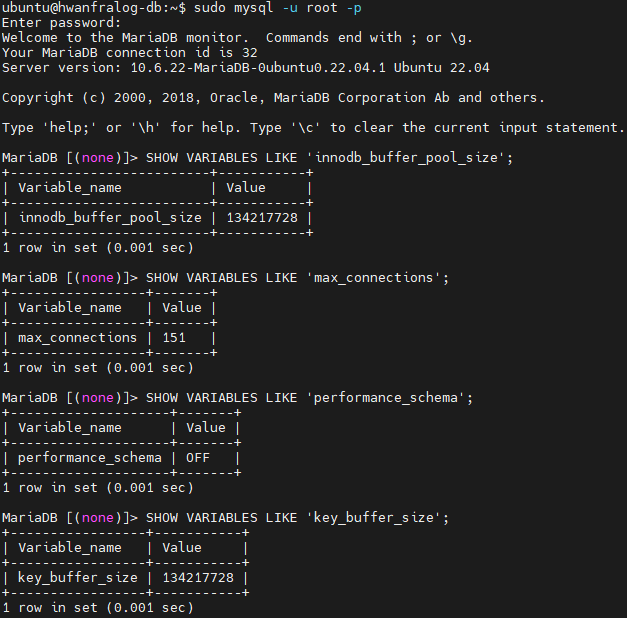
Now, open your configuration file (usually at /etc/mysql/mariadb.conf.d/50-server.cnf) and apply the following changes under the [mysqld] block:
[mysqld]
# Memory optimization for low-spec instances
performance_schema      = OFF
innodb_buffer_pool_size = 64M
max_connections         = 30
key_buffer_size         = 8M
Restart the service to commit the changes: sudo systemctl restart mariadb
sudo systemctl restart mariadb
The Verdict: 60MB Stability

Look at the RES (Resident Set Size). The mariadbd process is now hovering around 60 MiB. By stripping the fixed overhead, we’ve freed up critical breathing room for Nginx and PHP-FPM. In a 512MB environment, every megabyte saved is a win for uptime.