TL;DR: If your MariaDB service keeps stopping on low-memory cloud instances (like AWS Lightsail $5 plan), it’s likely due to the OOM (Out of Memory) Killer. The simplest fix is adding a 2GB swap file to provide a safety net for your RAM.
1. The Problem: Memory Starvation on 512MB Instances When you launch a fresh Ubuntu instance on Lightsail, you only have about 416MiB of usable RAM.
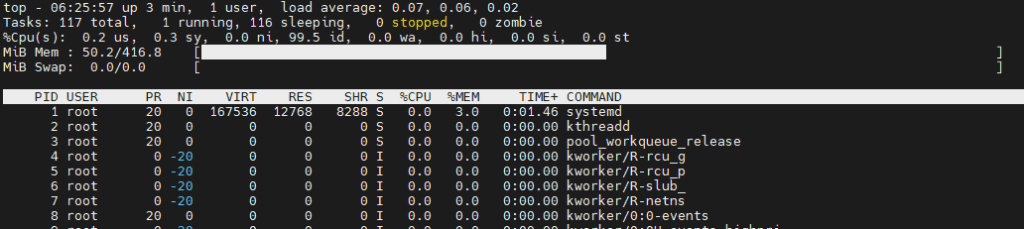
Installing MariaDB adds significant memory pressure. Without a swap space, the Linux kernel will force-terminate the MariaDB process to prevent a system-wide crash. This is the “OOM Killer” in action.
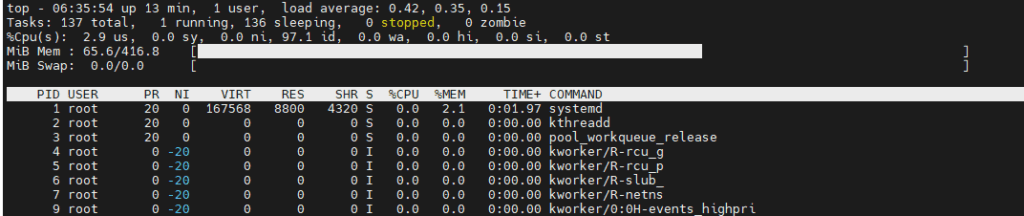
2. Identifying the Culprit Run top or free -m on your terminal. If you see Swap: 0.0/0.0, your server is a ticking time bomb.
3. The Solution: Adding a 2GB Swap File Follow these steps to create a 2GB swap space, which is sufficient for small-scale database operations.
# Create a 2GB swap file
sudo fallocate -l 2G /swapfile

# Secure the file permissions
sudo chmod 600 /swapfile

# Set up the swap area
sudo mkswap /swapfile

# Enable the swap
sudo swapon /swapfile

# Make the change permanent
echo '/swapfile none swap sw 0 0' | sudo tee -a /etc/fstab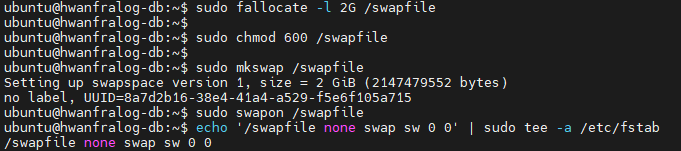
💡 Note for Rocky Linux/RHEL users: If you’re on a RHEL-based system, check out my earlier post: [Linux Fundamentals #4] The Essential Lifeline for Low-Spec Servers: Swap Memory Setup Guide
4. Verification After running the commands, verify the status using top. You should now see 2048.0 in the Swap field.
Conclusion Adding swap space is a “must-do” optimization for low-memory VPS instances. While it’s not a replacement for physical RAM, it provides the necessary stability to keep your database services running 24/7 without sudden crashes.