(For the Korean version, click here)
Introduction: Why Use a Personal Account Instead of the Default?
When you first create an AWS Lightsail or EC2 instance, you are typically provided with a default account like bitnami or ubuntu. However, to manage a server effectively or to leave a clear trail of your own administrative actions, it is better to operate with a dedicated personal admin account.
Setting up your account to gain root privileges instantly via sudo -i without typing a password every time significantly boosts workflow efficiency. Today, we will walk through creating a new account named hwans and configuring it for passwordless administrative access.
Creating the New User (hwans)
First, create a new user account on the system.
Bash
# -m: Create home directory, -s: Set default shell to bash
sudo useradd -m -s /bin/bash hwans
Once the account is created, set a password to be used for logging in.
Bash
sudo passwd hwans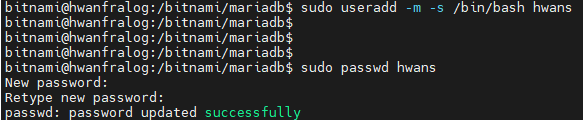
Adding User to the Admin (sudo) Group
To use the sudo command in Linux, the user must belong to the sudo group (or the wheel group).
Bash
sudo usermod -aG sudo hwans- Note: For CentOS-based systems, use the
wheelgroup; for Ubuntu/Debian, use thesudogroup.

Setting Up Passwordless sudo (visudo)
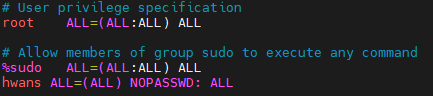
Now, we will configure the hwans user to switch to root immediately without being prompted for a password when running sudo -i. This task must be performed safely using the visudo command.
Bash
# Force using the vi editor to run visudo
sudo EDITOR=vi visudo
Add the following line to the very bottom of the file:
Plaintext
hwans ALL=(ALL) NOPASSWD: ALL- Meaning: This setting allows the user
hwansto execute any command on any host without requiring a password (NOPASSWD).
Testing and Verifying root Access
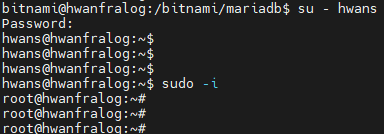
Now, log in as the new user and verify the configuration. (If SSH keys are not yet configured, test by switching users with su - hwans first.)
Bash
# 1. Switch to the new user
su - hwans

# 2. Test switching to root without a password
sudo -i
If your prompt changes from hwans@hwanfra-blog:~$ to root@hwanfra-blog:~# instantly without a password prompt, the setup is successful!
💡 Engineer’s Note: Balancing Convenience and Security
Not having to type a password every time is extremely convenient, but it also means you must pay closer attention to account security (such as managing SSH keys). Always remember the infrastructure management proverb: “With great convenience comes great responsibility.”
“I know… I know this is technically a security vulnerability. But I just can’t give up on the convenience! Since this is my personal server, I’m setting it up this way for efficiency. However, please keep in mind that actual production services require a thorough security review before applying such settings.”
Closing
You are now ready to manage your server under the name hwans rather than the default bitnami. Using your own account is the true beginning of establishing server security and a proper management system.