We’ve successfully put MariaDB on a strict diet, but don’t pop the champagne just yet. In the cramped 512MB “apartment” of a $5 VPS, Nginx, PHP-FPM, and MariaDB have to live together. If one gets greedy, the OOM (Out of Memory) Killer will show up and start swinging its scythe.
Today, we’re going to tighten the belt on Nginx and the notorious memory-hog, PHP-FPM. Let’s make this stack lean and mean.
Nginx: “Do One Thing and Do It Well”
Nginx is naturally lightweight, but its default configuration often overestimates your hardware. On a 512MB Lightsail instance, you usually only have 1 vCPU. There’s no point in spawning multiple worker processes; it just adds unnecessary context-switching overhead.
Edit /etc/nginx/nginx.conf:
worker_processes 1;        # For 1 vCPU, 1 is the golden rule.
worker_connections 512;    # Unless you have thousands of concurrent hits, this is plenty.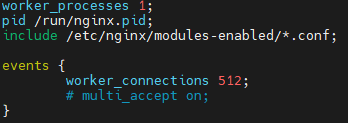
PHP-FPM: The “Default Value” Trap
When you open your FPM config, you might see pm.max_children = 5 and think, “Hey, it’s already optimized!” Don’t fall for it. The secret isn’t just the number; it’s the math behind your available RAM vs. your PHP process size.
On average, a single PHP-FPM process consumes between 30MB to 50MB. Let’s do the math:
$$\text{Max Children} = \frac{\text{Free RAM} – \text{Buffer for OS/DB}}{\text{Avg. Memory per PHP Process}}$$
If max_children is set to 5, PHP alone could gobble up 250MB. On a 512MB server, after the OS and MariaDB take their share, that’s a recipe for a crash.
Strategy A: The “Dynamic” Approach (Better for Response Time)
If you have consistent traffic, stick with dynamic but keep the boundaries tight.
Ini, TOML
pm = dynamic
pm.max_children = 5       ; This is your absolute ceiling.
pm.start_servers = 2
pm.min_spare_servers = 1
pm.max_spare_servers = 3
Strategy B: The “Ondemand” Approach (The Ultimate RAM Saver)
This is my top recommendation for low-spec servers. It kills idle processes and only spawns them when a request actually hits the server.
pm = ondemand
pm.max_children = 5
pm.process_idle_timeout = 10s;  # No work? Give the RAM back in 10 seconds.
Verification: Trust but Verify
Configuration is only half the battle. You need to see the results. Restart your services and check the “real-world” impact.
sudo systemctl restart nginx
sudo systemctl restart php-fpm
Fire up top or htop and hit Shift + M to sort by memory usage.
